Three ways to set a precise range
Use Set A and Set B while listening, drag the A–B timeline, or enter times in the A and B fields. The separate fine-tune buttons move either boundary by 0.1 seconds.
A–B loop guide
Mark the exact beginning and end of a YouTube section, then let LoopVideo return to that range automatically.
Paste an embeddable YouTube link, tap the video thumbnail, play to the start and press Set A, then play to the end and press Set B. Use the A and B fields or the ±0.1-second controls to refine the range.
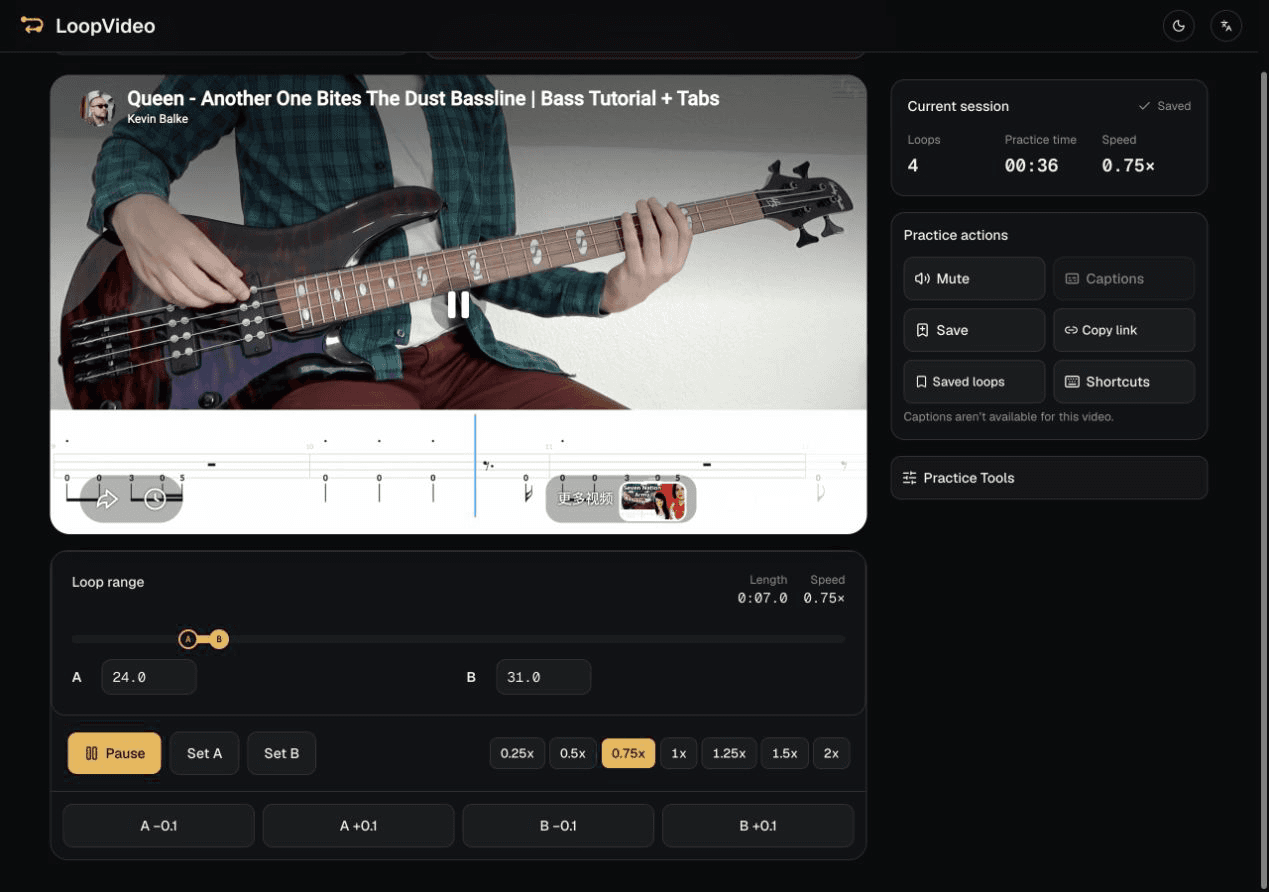
A valid link opens the real LoopVideo workspace automatically.
Start the embedded player. When the section begins, press Set A.
Continue playing and press Set B where the section should return to A.
Adjust either point by 0.1 seconds, then use Copy link to preserve the supported loop settings.
Use Set A and Set B while listening, drag the A–B timeline, or enter times in the A and B fields. The separate fine-tune buttons move either boundary by 0.1 seconds.
Copy link creates a LoopVideo URL containing the video and supported loop state. Saved loops stay only in the current browser.
The video must permit embedding and have a fixed duration. Private, removed, age-restricted, embedding-disabled, and live videos may not work. Returning to A can include a small seek delay.
Paste a YouTube link in LoopVideo and mark the exact section you need.
Open LoopVideo