LoopVideo
  • Recent practice
  • How it works
LoopVideo
LoopVideo

Precise YouTube A-B looping for practice and study — no account, no downloads.

Product
  • Recent practice
  • How it works
  • Music practice guide
  • For teachers
Company
  • About
  • Contact
Legal
  • Cookie Policy
  • Privacy Policy
  • Terms of Service
© 2026 LoopVideo. All Rights Reserved.
  1. Home
  2. How to Loop a YouTube Video

YouTube loop guide

How to Loop a YouTube Video

Repeat the full upload or narrow playback to the exact section you want to study or practise.

Paste a valid link and the practice studio opens automatically.

Quick answer

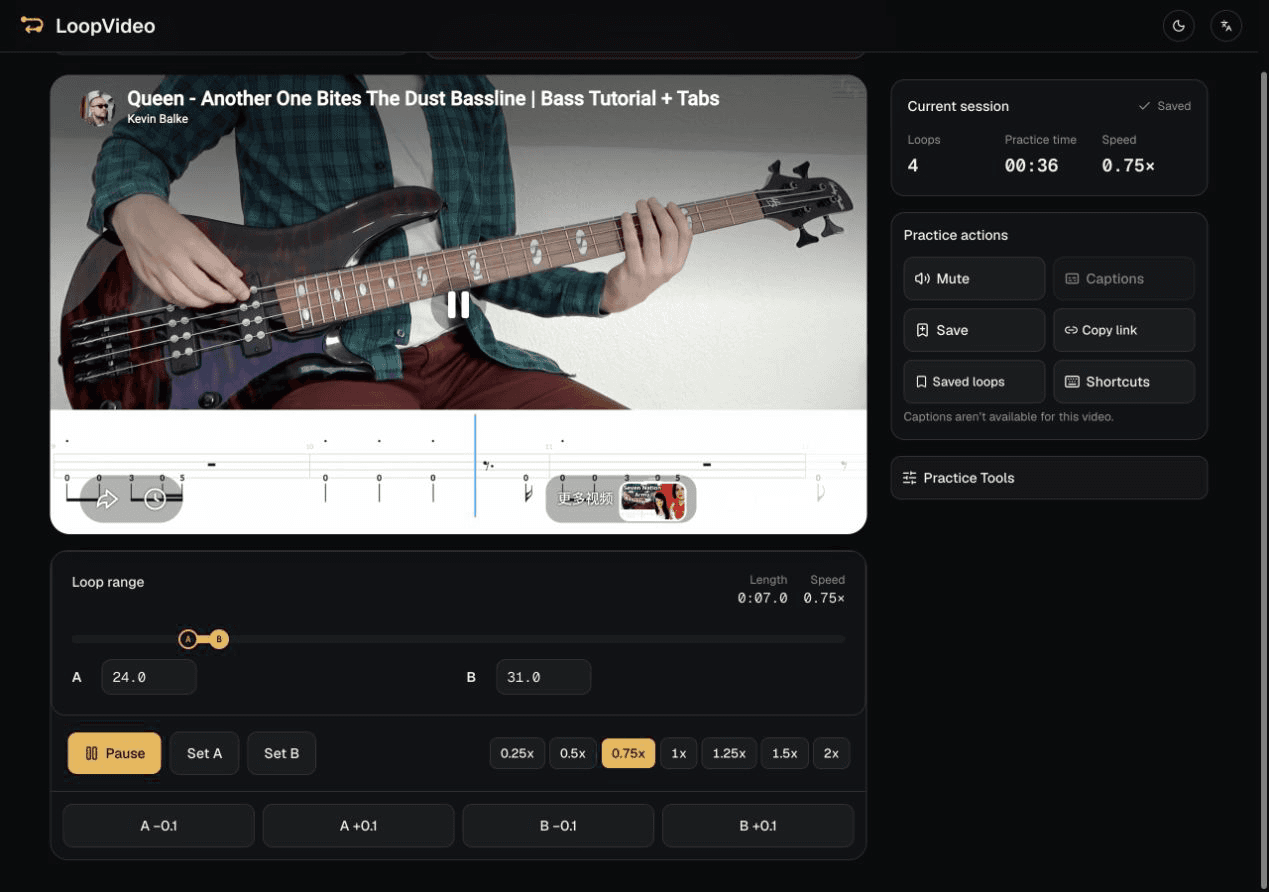
Paste a valid YouTube link and tap the thumbnail to start the player. Leave the full range in place to repeat the uploaded video, or use Set A and Set B to repeat one section.

LoopVideo desktop workspace showing a loaded YouTube A–B practice loop and its playback controls

How to loop a video in LoopVideo

  1. 1

    Paste an embeddable YouTube link

    LoopVideo recognises the video and opens its workspace.

  2. 2

    Tap the thumbnail to load the player

    This user action loads the real embedded YouTube player.

  3. 3

    Keep the full range or set A and B

    The full uploaded video repeats at the end; explicit A and B points repeat a smaller section.

  4. 4

    Save locally or copy the link

    Save keeps the loop in this browser. Copy link creates a reusable LoopVideo URL.

YouTube desktop Loop versus LoopVideo A–B repeat

In YouTube's current desktop player, right-click the video and select Loop to repeat the whole video from beginning to end. Use LoopVideo when you need an A–B section, a full-range repeat with a supported speed or rest setting, or a reusable link that reopens the supported loop state.

Shape the repetition after it starts

Choose a playback rate offered for that video, refine A and B, or add a short rest between loops. These settings work in LoopVideo and do not alter the YouTube upload.

Not every YouTube video can be embedded

LoopVideo uses YouTube's embedded player and does not download or proxy videos. Videos may fail when embedding is disabled, or when they are age-restricted, private, removed, or otherwise unavailable. Live streams are unsupported because they have no fixed duration. Returning to A may have a small seek delay; available speeds and captions differ by video. Saved loops and history stay in the current browser. Background playback and lock-screen playback are unsupported in LoopVideo.

Frequently asked questions

Can LoopVideo repeat the full YouTube video?
Yes. After the embedded player loads, leave the default full range in place and the uploaded video returns to the beginning at its end.
Can I repeat only one section?
Yes. Press Set A at the beginning and Set B at the end, or edit the A and B values directly.
Do I need an account?
No. The looping workspace works without an account. Saved loops and recent practice remain in the current browser.
Does LoopVideo download the YouTube video?
No. LoopVideo uses YouTube's embedded player and does not download, copy, or proxy the video.

Choose a more focused guide

Loop Part of a YouTube Video

Set a precise A–B range and refine either boundary by 0.1 seconds.

Repeat YouTube Videos on Mobile

Complete the real browser workflow on iPhone or Android.

Slow Down and Loop a YouTube Video

Choose an available YouTube rate and repeat the difficult section.

YouTube Loops for Language Learning

Build a listening, dictation, or shadowing loop from one short sentence.

Start a real YouTube loop

Paste an embeddable YouTube link and choose a full-video or A–B repeat.

Open LoopVideo